
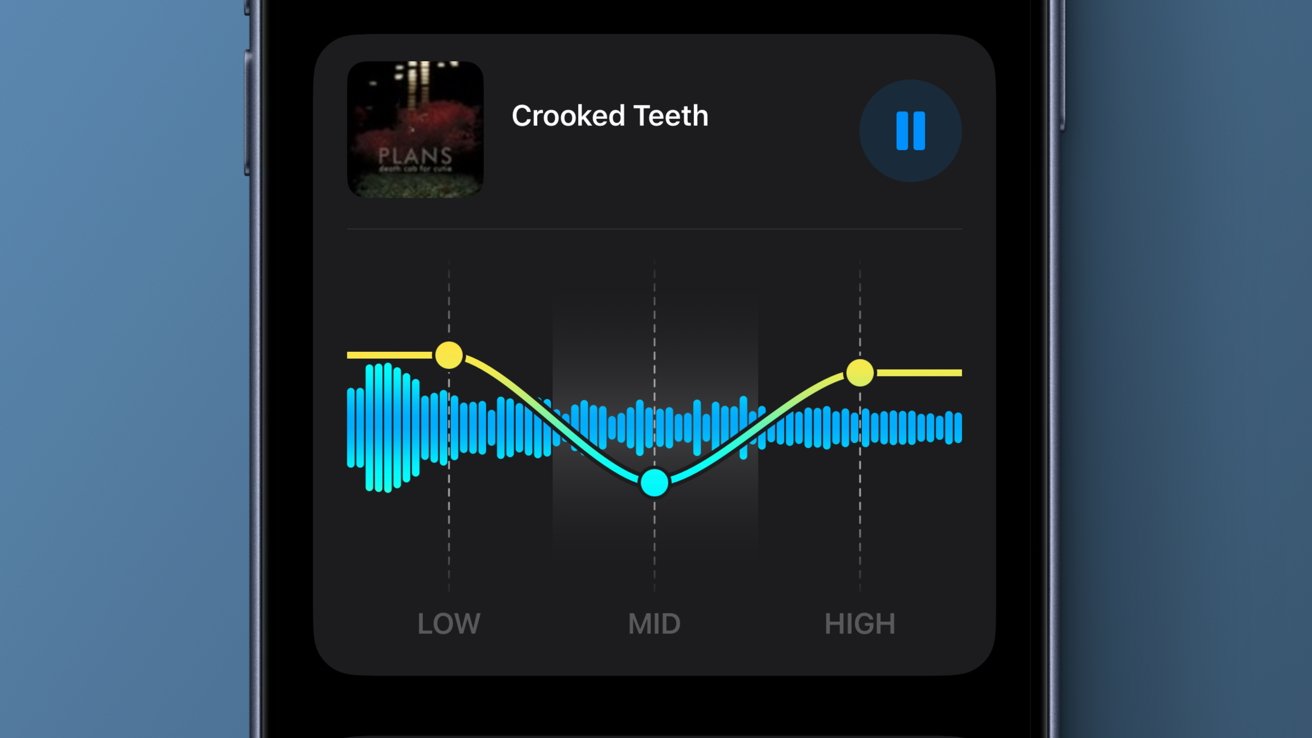
Apple Finally Adds Native EQ Controls to AirPods in iOS 27
For years, AirPods users have relied on third-party apps, workarounds, and the system-wide Music EQ setting to shape how their earbuds and headphones sound. None of those solutions were ideal — the Music app's equalizer only worked inside Apple Music, and nothing offered a clean, centralized way to tune your AirPods audio across every app and use case. With iOS 27, Apple has finally solved that problem. A native AirPods equalizer is now built directly into the Settings app, and it works with the latest generation of Apple's most popular audio hardware.
Announced during Apple's 2026 WWDC keynote alongside a host of other quality-of-life improvements, the new AirPods EQ feature was one of the most enthusiastically received additions of the entire presentation. It may not be a sweeping reinvention of how we listen to audio, but for the millions of people who wear AirPods every single day, it is a genuinely meaningful upgrade that has been a long time coming.
Which AirPods Support the New EQ Settings?
Not every pair of AirPods will get access to the new equalizer controls. Apple has confirmed that the feature is available on the following models:
- AirPods Max 2 — Apple's premium over-ear headphones get the full EQ treatment, which makes a lot of sense given their audiophile-adjacent positioning and their larger driver hardware.
- AirPods Pro 3 — The latest generation of Apple's flagship noise-cancelling earbuds now lets users fine-tune their sound signature beyond the existing Adaptive Audio and transparency modes.
- AirPods 4 — Even the standard AirPods 4, Apple's most affordable current earbuds, are included in the update, giving entry-level buyers access to a feature previously unavailable on any AirPods model.
If you are using an older model such as the original AirPods Max, AirPods Pro 2, or AirPods 3, you will not see the new EQ controls appear in your Settings. Apple has not officially confirmed whether older-generation hardware will receive support in future updates, but given the typical pattern of hardware-tied features, it seems unlikely.
Where to Find AirPods EQ in iOS 27
Finding the new equalizer is straightforward once you know where to look. The setting lives inside the dedicated AirPods section of the Settings app, which has been gradually expanding over recent iOS releases as Apple adds more controls and personalization options for its audio hardware.
To access the AirPods EQ in iOS 27, follow these steps:
- Open the Settings app on your iPhone running iOS 27.
- Make sure your compatible AirPods are connected and paired to your device.
- Scroll down and tap on your AirPods listing near the top of the menu, just below your Apple ID section.
- Look for the new Equalizer or EQ section within the AirPods settings page.
- Tap to open the EQ interface, where you will find adjustable sliders for lows, mids, and highs.
The interface itself is clean and minimal, consistent with Apple's broader design philosophy. You are presented with a visual representation of the frequency curve alongside three clearly labeled adjustment zones: Low, Mid, and High. Each can be pushed up or down to your preference, and the changes apply in real time as you listen.
What the AirPods EQ Can Actually Do
The new AirPods equalizer gives users direct manual control over three frequency bands. While this is a simplified three-band EQ rather than the ten-band or parametric equalizers you might find in dedicated audio applications, it covers the most meaningful range of adjustments for everyday listening.
The Low band controls bass frequencies — adjusting it upward adds more warmth, punch, and body to music and podcasts, while pulling it down creates a leaner, more neutral sound. The Mid band shapes the presence of vocals, guitars, and most of the core musical content you hear in a typical track. Boosting the mids can make voices feel more forward and intimate, while cutting them can reduce a perceived harshness in certain recordings. The High band handles treble and air — the shimmer of cymbals, the crispness of consonants in speech, and the overall brightness of the audio.
What makes this implementation particularly useful is that the EQ applies system-wide. Unlike the EQ inside the Music app, which only affects playback within that single application, the new AirPods EQ persists across every app on your device. Whether you are streaming on Spotify, watching a video on YouTube, taking a call, or listening to a podcast, your custom sound profile follows you everywhere.
A Long-Awaited Feature Worth the Wait
The absence of a native AirPods EQ has been a recurring frustration in the Apple community for years. Competing earbuds from Sony, Bose, and Samsung have offered companion app equalizers for some time, and many users have wondered why Apple — a company with a deep investment in audio quality — had left the feature off the table for so long.
The iOS 27 implementation is not the most complex equalizer on the market, and power users who want granular, multi-band control will likely continue to reach for dedicated audio apps. But for the vast majority of AirPods owners who simply want their earbuds to sound a little better without fuss, this is exactly the kind of simple, well-integrated solution Apple excels at delivering.
Should You Adjust Your AirPods EQ Settings?
If you are happy with how your AirPods sound today, there is no obligation to touch the new EQ settings at all — the default position leaves your audio unaltered. But if you have ever felt that your AirPods sound a touch too thin, too boomy, or too bright for your taste, this is your opportunity to do something about it without relying on a third-party app or an unofficial workaround.
Experimenting with the settings costs nothing and takes less than a minute. Start with small adjustments rather than dramatic changes, and give each configuration a few minutes of real listening time before moving on. Good audio tuning is a personal and subjective process, and the best EQ setting is simply the one that sounds right to you.
With iOS 27, Apple has taken a small but genuinely welcome step toward giving users more ownership over their listening experience. It is a feature that should have arrived sooner, but it is here now — and it works well.