
What Is the Reduce Interruptions Focus Mode on iPhone?
If you've ever felt like your iPhone never stops buzzing, beeping, or flashing banners at the worst possible moments, Apple has built a solution directly into iOS 18. The Reduce Interruptions Focus Mode is a powerful feature powered by Apple Intelligence that intelligently filters your notifications — keeping the ones that matter and silencing the ones that don't. Unlike older Do Not Disturb settings that simply muted everything, this mode is smart enough to know the difference between a critical message and a promotional email you can read later.
Announced by Craig Federighi at WWDC 2024, the feature was introduced as a flagship example of how Apple Intelligence works differently from standalone AI tools like ChatGPT. Rather than being a separate app you open and interact with, Apple Intelligence is woven directly into the fabric of iPhone, iPad, and Mac. The Reduce Interruptions mode is one of the clearest demonstrations of that philosophy in action.
How Apple Intelligence Powers Smarter Notification Filtering
At its core, the Reduce Interruptions Focus Mode uses on-device Apple Intelligence models to analyze incoming notifications in real time. Instead of blocking all alerts or letting all of them through, the system reads the content, the sender, your habits, and the context of each notification to make a judgment call about whether it deserves to interrupt you immediately.
This is a meaningful leap forward from previous Focus Modes, which required you to manually build allowed contact lists and app exceptions. With Apple Intelligence doing the heavy lifting, the system learns what's genuinely important to you over time, making the filtering smarter the more you use it.
As Federighi put it during the WWDC 2024 keynote: "Your iPhone can prioritize your notifications to minimize unnecessary distractions while ensuring you don't miss something important." That balance — fewer interruptions without missed urgencies — is exactly what this mode is designed to deliver.
What Does "Intelligent Breakthrough and Silencing" Mean?
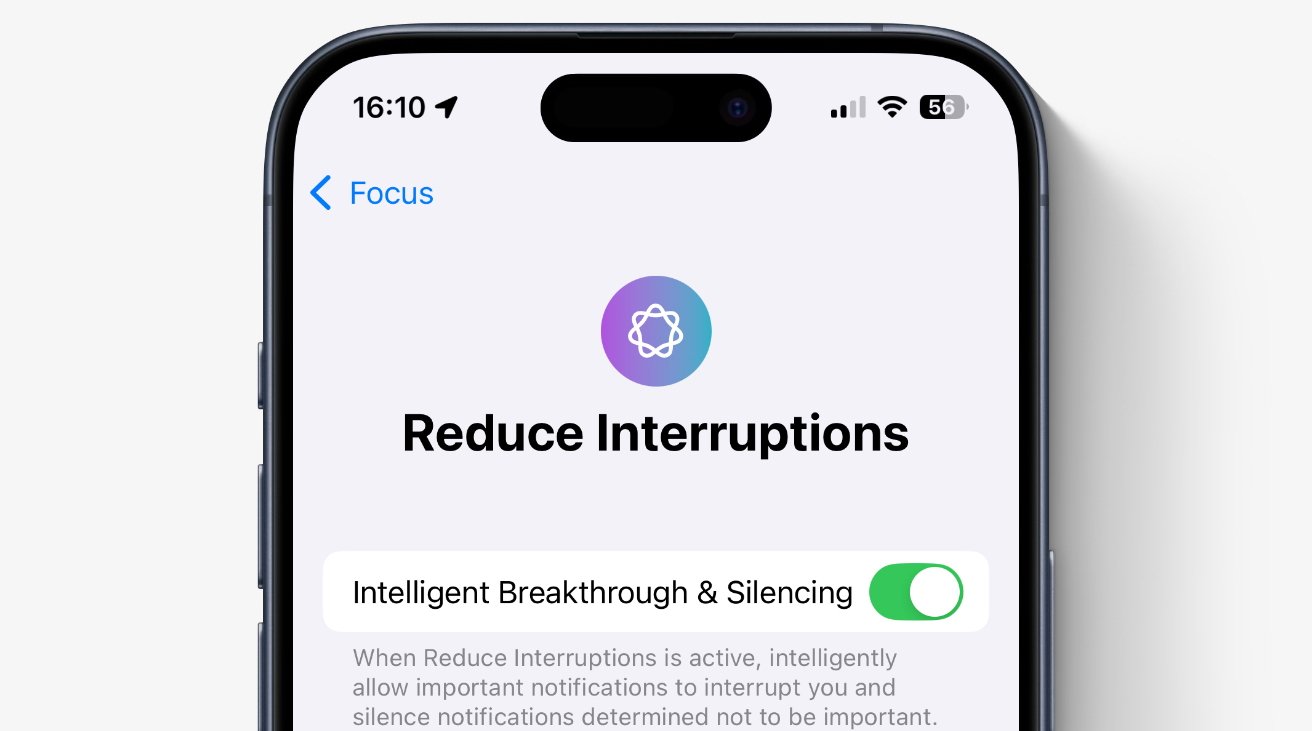
When you enable Reduce Interruptions, you'll notice a setting called Intelligent Breakthrough & Silencing. This is the engine behind the feature. Here's what each part does:
- Intelligent Breakthrough: Notifications that Apple Intelligence determines are time-sensitive or genuinely important are allowed to break through the Focus Mode and alert you normally. For example, a text from a family member saying they've been in an accident would be flagged as critical and delivered immediately.
- Intelligent Silencing: Notifications that are deemed low-priority — think marketing emails, social media likes, or app update reminders — are held back and delivered quietly to your notification summary, where you can review them at a convenient time.
Together, these two mechanisms create a dynamic filter that adapts to the situation rather than applying a blunt, one-size-fits-all rule. The result is an iPhone that interrupts you far less often, but still has your back when something truly urgent comes through.
How to Set Up Reduce Interruptions on Your iPhone
Getting started with the Reduce Interruptions Focus Mode is straightforward. Here's how to enable and configure it on your iPhone running iOS 18 with Apple Intelligence active:
- Open the Settings app on your iPhone.
- Scroll down and tap Focus.
- Tap the + button in the top-right corner to add a new Focus Mode, then select Reduce Interruptions from the list.
- Follow the on-screen prompts to set it up. You can choose to enable it manually, on a schedule, or have it activate automatically based on your location or app usage.
- Once set up, make sure Intelligent Breakthrough & Silencing is toggled on within the Focus settings to take full advantage of Apple Intelligence.
You can also activate it quickly from the Control Center. Simply swipe down from the top-right corner of your screen, tap the Focus button, and select Reduce Interruptions from your list of modes.
Reduce Interruptions vs. Do Not Disturb: What's the Difference?
It's easy to confuse Reduce Interruptions with the older Do Not Disturb mode, but they serve fundamentally different purposes. Do Not Disturb is a blunt instrument — it silences essentially everything unless you've set up specific exceptions. Reduce Interruptions, on the other hand, is a nuanced tool that actively evaluates each notification rather than blocking or allowing based on rigid rules.
If you're in a meeting, for instance, Do Not Disturb would mute your phone entirely (unless someone from your favorites list called). Reduce Interruptions would silence the low-stakes alerts but still let through a notification that Apple Intelligence judges to be genuinely urgent — even from an app or contact not on any pre-set list.
This distinction makes Reduce Interruptions the better everyday choice for most users, while Do Not Disturb remains useful for situations where you want total silence, such as during sleep.
Tips for Getting the Most Out of Reduce Interruptions
To make the Reduce Interruptions Focus Mode work as effectively as possible, keep these tips in mind:
- Keep Apple Intelligence enabled: The feature relies entirely on Apple Intelligence, so make sure it's active in your Settings under Apple Intelligence & Siri.
- Check your notification summary regularly: Silenced notifications are delivered in a bundled summary, usually in the morning and evening. Make a habit of reviewing it so nothing slips through the cracks.
- Use it consistently: The more you use the mode, the better Apple Intelligence becomes at understanding your priorities and refining what it lets through.
- Pair it with a schedule: Consider setting Reduce Interruptions to activate automatically during your core working hours so you don't have to remember to turn it on manually.
Why This Feature Matters in the Age of Constant Connectivity
The average smartphone user receives dozens of notifications every day, and research consistently shows that even brief interruptions can break concentration for significantly longer than the interruption itself lasted. The Reduce Interruptions Focus Mode directly addresses this problem, not by cutting you off from your digital life, but by acting as a thoughtful gatekeeper that applies judgment rather than just rules.
Apple's approach of embedding Apple Intelligence throughout the operating system — rather than packaging it as a separate product — means that features like this one feel seamless and natural. You don't have to learn a new app or develop new habits. You simply benefit from a phone that pays attention to what matters to you and acts accordingly.
For anyone who has ever felt overwhelmed by notifications or frustrated by constant interruptions, the Reduce Interruptions Focus Mode is one of the most practical and immediately impactful features Apple has introduced in recent years. It's worth setting up today.